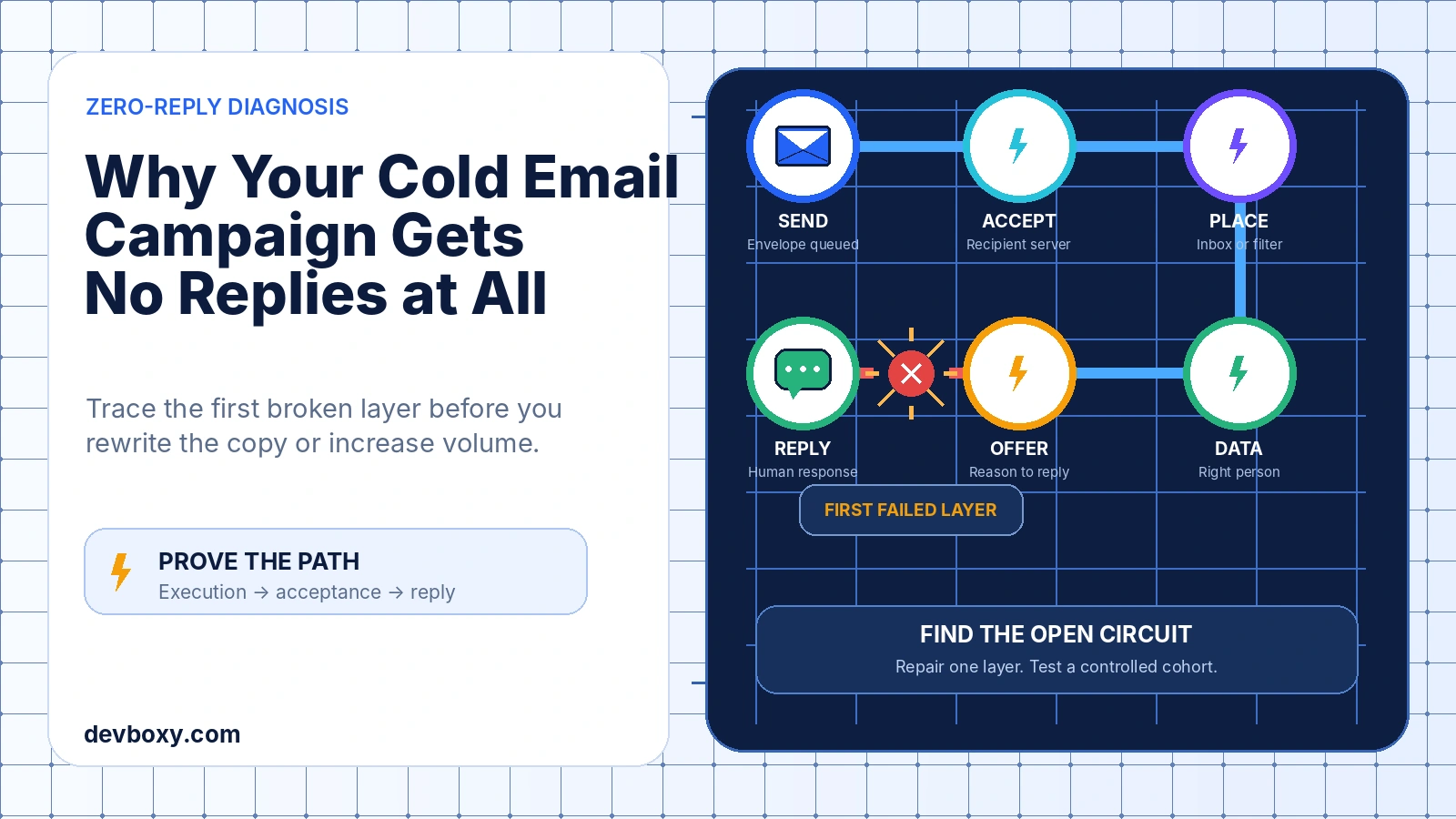
A cold email campaign with no replies at all should be treated as a system failure until the evidence proves otherwise.
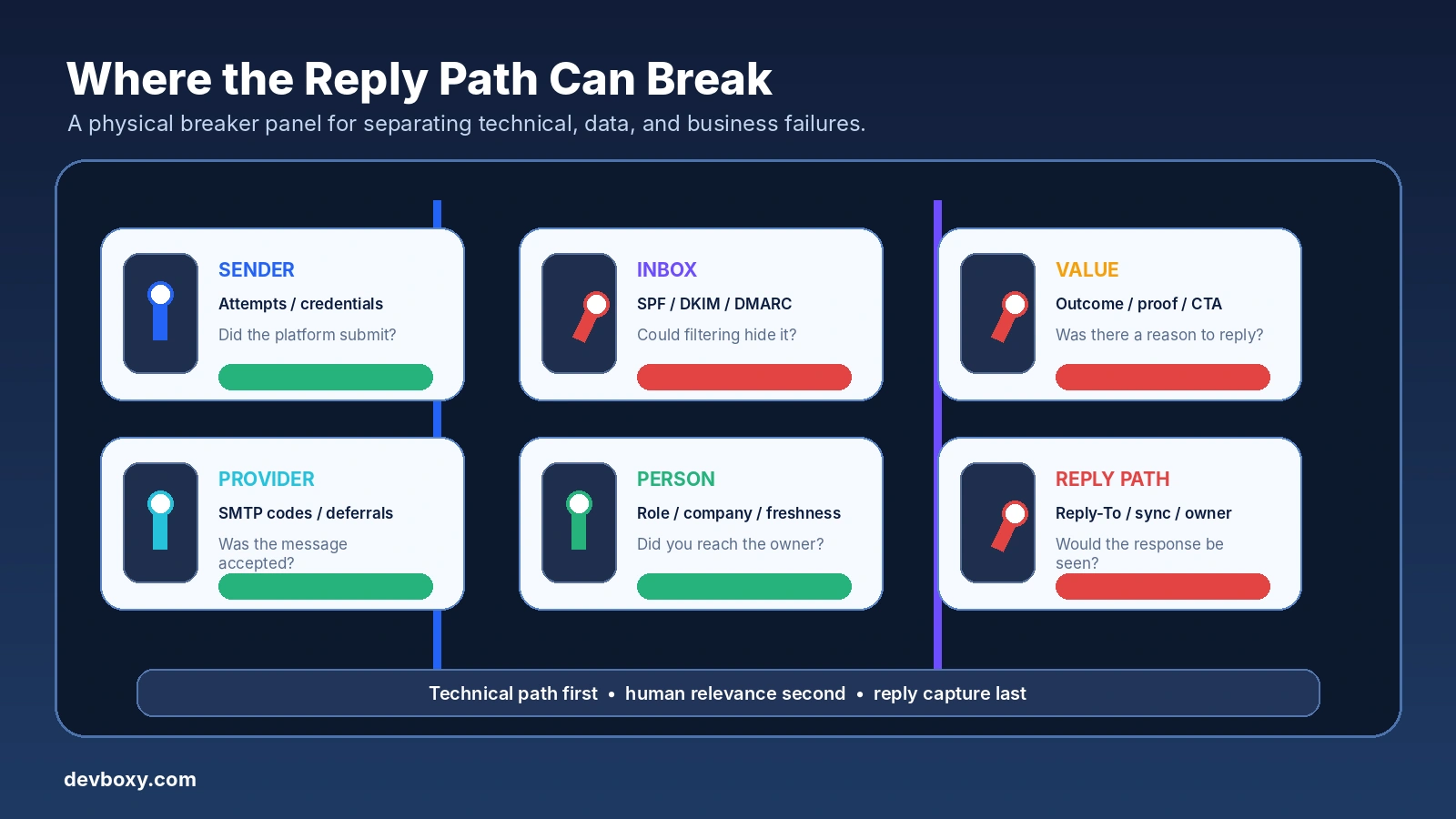
The problem may be the offer or copy, but it can also happen much earlier: the campaign may not have sent, providers may have deferred or rejected messages, mail may have landed where prospects never saw it, the list may contain the wrong people, or replies may not be reaching the team.
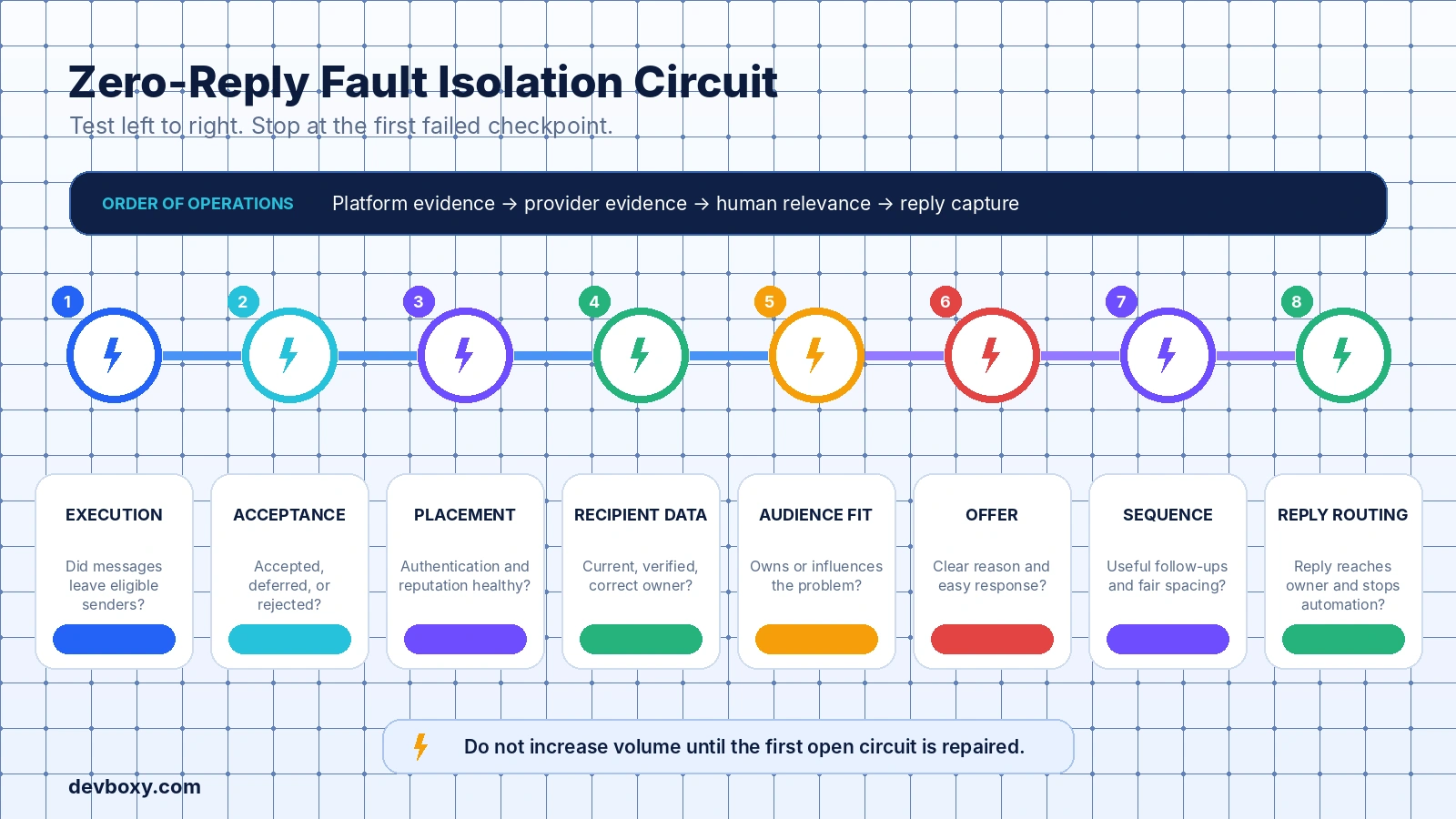
That is why rewriting the subject line first is usually the wrong diagnostic move. Start at the beginning of the message path and prove each stage in order: campaign execution, SMTP acceptance, sender health, recipient data, audience fit, message value, sequence coverage, and reply routing.
This guide owns that complete deliverability-to-offer diagnostic flow. It is designed for campaigns with zero or near-zero human responses. A separate troubleshooting path is needed when reliable opens exist but replies do not, because that points more strongly toward relevance, value, trust, or reply friction.
Key Takeaways
Do not assume zero replies is a copy problem. First confirm that the campaign sent and that providers accepted the messages.
Measure human replies from unique delivered prospects. Keep out-of-office messages, delivery notices, and other automated events separate.
An SMTP acceptance proves that a receiving system accepted responsibility for the message; it does not prove inbox placement or human attention.
Check provider patterns. A failure concentrated at Gmail, Outlook, one company domain, one sender, or one list source is more useful than a blended campaign average.
Verification reduces address-level risk, but it does not prove that the person still owns the role, cares about the problem, or will see the message.
Fix one major layer at a time and use a controlled cohort. Changing the domain, audience, offer, copy, cadence, and CTA together destroys the evidence.
Pause or narrow the campaign when systemic delivery, suppression, reply-routing, or compliance problems are suspected.
Define “No Replies” Before You Diagnose It
Teams often say a campaign has no replies when the underlying measurement is unclear. Before investigating, define the outcome precisely.
For this guide, no replies means that no identifiable human prospect responded during the observation window among the unique prospects whose messages were accepted for delivery. Automated events should be reported separately.
Question | Why it matters | Required evidence |
|---|---|---|
Did the campaign actually execute? | A published or scheduled campaign may still have zero real send attempts. | Recipient-level attempt records, timestamps, and sender identity. |
How many unique prospects were attempted? | Message events and follow-ups can inflate counts if you treat them as people. | Unique campaign-recipient count. |
How many prospects were accepted? | A send attempt is not the same as recipient-server acceptance. | SMTP or provider delivery status by recipient. |
Which events count as human replies? | Out-of-office and delivery reports can make the campaign look active without a real conversation. | Reply classification and message-source evidence. |
Has the planned sequence window elapsed? | A campaign cannot be judged before prospects have had a fair chance to receive and answer the planned touches. | Sequence schedule, business-day logic, pauses, and remaining steps. |
Also check whether the result is truly zero or merely too small to interpret. A tiny campaign can produce no responses through ordinary variation. That does not make the campaign healthy, but it does mean the percentage alone cannot identify the cause.
Use a Deliverability-to-Offer Diagnostic Order
Investigate the campaign in the same direction the message travels. Each stage depends on the previous one. There is no value in debating the CTA when the mailbox was restricted from sending, and no value in rotating domains when the offer is irrelevant to the audience.
Diagnostic stage | Question to prove | Typical evidence |
|---|---|---|
1. Execution | Did the intended messages leave an eligible sender? | Attempt logs, queue state, sender status, provider response. |
2. Acceptance | Did recipient systems accept, defer, or reject them? | SMTP codes, bounces, deferrals, provider patterns. |
3. Placement and reputation | Were messages likely available in a place the recipient checks? | Authentication, Postmaster data, complaints, reputation, seed evidence. |
4. Recipient data | Are the addresses current, reachable, and attached to the intended people? | Verification results, job-role review, source age, suppression history. |
5. Audience fit | Does the recipient own or influence the problem? | ICP criteria, role ownership, triggers, sample review. |
6. Offer and message | Is there a credible reason to care and an easy way to respond? | Value proposition, proof, objection review, rendered copy. |
7. Sequence | Did the campaign create enough useful opportunities to respond? | Follow-up count, spacing, new value, stop conditions. |
8. Reply routing | Would a real reply reach the correct system and owner? | External reply test, inbox sync, alias coverage, event logs. |
Stage 1: Confirm the Campaign Actually Sent
Begin with recipient-level facts rather than the campaign status shown at the top of a page. “Active,” “running,” or “completed” can describe an orchestration state without proving that every intended message was submitted successfully.
Review:
how many unique prospects became eligible;
how many send attempts were created;
which sender account was assigned to each attempt;
whether credentials, permissions, tokens, or SMTP connections failed;
whether daily, hourly, provider, or internal safety limits blocked execution;
whether the campaign was paused, scheduled outside its window, or waiting on a previous step;
whether records were skipped because of suppression, duplication, missing fields, or sender ineligibility.
Do not compare a campaign’s intended audience with its reply count. Compare actual unique attempts, accepted unique prospects, and human responders.
Use the broader cold email campaign launch checklist to review the controls that should have been proven before the campaign started.
Stage 2: Read SMTP and Provider Evidence Before Guessing
SMTP evidence tells you whether the message transaction succeeded, failed temporarily, or failed permanently. Under RFC 5321, a 2yz reply represents successful completion, a 4yz reply represents a transient negative condition, and a 5yz reply represents a permanent negative condition.
That distinction matters:
Accepted: the receiving system took responsibility for the message. This still does not prove inbox placement.
Deferred: the message was not accepted yet. Repeated deferrals can delay the campaign beyond the intended observation window.
Rejected: the message was not accepted. Permanent failures should not be treated as delivered prospects.
Aggregate the evidence by recipient provider, sender account, sending domain, IP where applicable, campaign step, and list source. A blended campaign total can hide a severe cluster, such as one sender failing at Outlook or one newly imported segment producing most permanent failures.
Read the full enhanced status text where available, but do not build automation around the wording alone. Codes, structured provider events, and repeated patterns are more reliable than one free-text phrase.
Stage 3: Check Authentication, Reputation, and Likely Placement
Once messages are being accepted, investigate whether the sender meets current receiver expectations and whether the traffic pattern creates filtering pressure.
Google’s current email sender guidelines cover authentication, TLS, DNS, message format, spam rates, and unsubscribe requirements. Google’s sender-guideline FAQ explains that noncompliant messages may be rejected or placed in spam. Yahoo’s sender best practices likewise require authentication, low complaint rates, valid forward and reverse DNS, and additional controls for bulk senders.
Review the actual messages produced by every sender:
SPF authorization for the sending source;
DKIM signature and selector;
DMARC policy and alignment with the visible From domain;
TLS transport;
valid forward and reverse DNS where you manage the sending IP;
consistent From identity and legitimate reply path;
spam complaints, reputation signals, and provider-specific error clusters;
sudden changes in volume, sender mix, domain, links, or content.
Use the DevBoxy Email DNS Checker to review SPF, DKIM, DMARC, and MX together, and the Domain Health Checker for a broader sending-domain review.
A public blocklist check can reveal selected listings, but a clean result does not prove that Gmail, Yahoo, Microsoft, or a corporate gateway has no private reputation concern.
Microsoft’s current external sender policies and technical guidelines also emphasize standards compliance, reverse DNS, reputation management, easy unsubscribe, and stopping repeated sends after permanent non-delivery responses.
Stage 4: Audit Recipient Data, Not Just Syntax
A technically valid-looking address can still be wrong for the campaign. The person may have changed jobs, moved teams, lost ownership of the problem, or stopped using the mailbox. A role address may be deliverable but ignored for unsolicited commercial requests.
Review the list in layers:
Source: Where did the record come from, when was it collected, and what evidence supports the person-company match?
Structure: Are columns mapped correctly? Were domains, names, and company fields normalized without damaging the source?
Verification: What status, reason, and timestamp were produced?
Identity: Does the person still work at the company and hold the relevant role?
Suppression: Did previous opt-outs, complaints, hard bounces, and internal exclusions survive the latest import?
Segmentation: Are Valid, Risky, Catch-All, Unknown, Invalid, and Disposable outcomes still distinguishable?
Use How to Clean a CSV Email List Before a Cold Campaign for the structural workflow, and Email Verification Results Explained before deciding which statuses are campaign-eligible.
Run eligible records through the DevBoxy Bulk Email Verifier, with the single Email Verifier available for corrections and exceptions. Verification reduces address-level uncertainty; it does not guarantee inbox placement or interest.
If the data is old, use the triggers in How Often Should You Reverify an Email List?. When a verified segment still fails, review Why Verified Emails Still Bounce instead of assuming the verifier and the receiving system are measuring the same thing.
Stage 5: Test Whether the Audience Owns the Problem
A campaign can reach real inboxes and still receive no replies because it reaches people who do not own the decision, do not recognize the problem, or have no reason to act now.
Review a sample of actual recipients manually. Ask:
Does this role experience, own, influence, or budget for the problem?
Is the company in the correct operating context, or did the filter select superficial similarities?
Is there a credible trigger, change, risk, or priority behind the outreach?
Would the message still make sense if the personalization tokens were removed?
Are several different personas receiving one generic message?
Are you contacting an individual who can redirect you, or a role inbox unlikely to engage?
Use Role-Based Email Addresses before treating addresses such as info@, sales@, support@, or admin@ as ordinary prospects.
Zero replies across several sender accounts but one shared audience source often points toward targeting, relevance, or data ownership rather than infrastructure.
Stage 6: Diagnose the Offer Before Polishing the Wording
Copy cannot rescue an offer the recipient does not understand, trust, or need. Before changing adjectives and subject lines, reduce the proposition to one sentence:
We help [specific audience] improve [specific outcome] by [credible mechanism], and the next step requires [small amount of effort].
Then test six questions:
Offer test | Failure signal | Repair |
|---|---|---|
Specific outcome | The promise is broad, abstract, or impossible to verify. | Name the operational change the buyer can evaluate. |
Relevant mechanism | The recipient cannot see how the offer applies to their situation. | Connect the method to a real workflow, constraint, or trigger. |
Credible proof | The message relies on unsupported superiority or guaranteed outcomes. | Use verifiable evidence, a relevant example, or transparent limitations. |
Reason to act | There is no urgency, change, cost, or opportunity. | Use a genuine trigger rather than artificial scarcity. |
Low-friction next step | The first email asks for a large meeting, evaluation, or commitment. | Ask a simple question the recipient can answer in one line. |
Respectful exit | The recipient cannot decline, redirect, or opt out easily. | Make “not relevant” a safe and useful response. |
Do not interpret silence as permission to add pressure. It may mean the message offers no clear value, the timing is wrong, the sender lacks trust, or the recipient is not the right owner.
Stage 7: Review the Complete Sequence
One message may not create enough context for a busy prospect to decide. At the same time, more steps do not automatically improve a weak campaign.
Review the sequence as one argument:
Does each follow-up add a new observation, proof point, resource, clarification, or easier decision?
Are the gaps wide enough for the recipient’s working rhythm and sales cycle?
Does the sequence stay in the same thread while the conversation remains the same?
Does every human reply stop future automated steps before send time?
Are out-of-office replies held and reviewed rather than treated as ordinary no-reply events?
Does the final message close the loop without manufacturing urgency?
Do not solve zero replies by blindly adding more follow-ups. First prove that messages are being delivered to the right people with a credible offer. Then adjust count and cadence through controlled tests.
Stage 8: Prove the Reply Path End to End
A prospect can respond correctly while the campaign still reports zero replies. Common causes include an unmonitored Reply-To address, expired mailbox connection, missing alias coverage, forwarding rules, a disconnected shared inbox, incorrect thread association, or an event listener that failed after the message arrived.
Use a controlled mailbox outside the sending environment:
Send a real campaign test through the same sender and sequence path.
Reply from the external mailbox with a unique phrase.
Confirm that the message reaches the intended mailbox.
Confirm that DevBoxy or the connected system records it as a reply.
Confirm that the correct prospect, campaign, and sequence are associated.
Confirm that future automated follow-ups become ineligible immediately.
Confirm that the responsible owner can see and answer the conversation.
Use the DevBoxy Email Header Analyzer when you need to inspect routing and authentication evidence in a received test message.
Build a Zero-Reply Evidence Table
Keep the investigation outside personal opinion. A compact evidence table lets the team see what has been proven and where uncertainty remains.
Layer | Proven healthy | Warning | Stop condition |
|---|---|---|---|
Execution | Recipient-level attempts exist from eligible senders. | Large skip or pending population. | No reliable evidence that messages left the platform. |
Delivery | Expected acceptance with limited, understood failures. | Provider-specific deferrals or rising rejection clusters. | Systemic authentication, policy, or permanent-failure pattern. |
Data | Current source, verification, identity, and suppression evidence. | Old or uncertain segment isolated for review. | Untraceable list or suppressed contacts remain eligible. |
Audience | Sample clearly owns or influences the problem. | Mixed personas or weak triggers. | No defensible reason for this group to receive the message. |
Offer and copy | Specific value, credible proof, easy question, respectful exit. | One element remains vague or high-friction. | Misleading, unsupported, or irrelevant proposition. |
Reply path | External reply test reaches owner and stops automation. | Manual workaround required. | Replies are lost, misattributed, or followed by automation. |
Run a Controlled Recovery Test
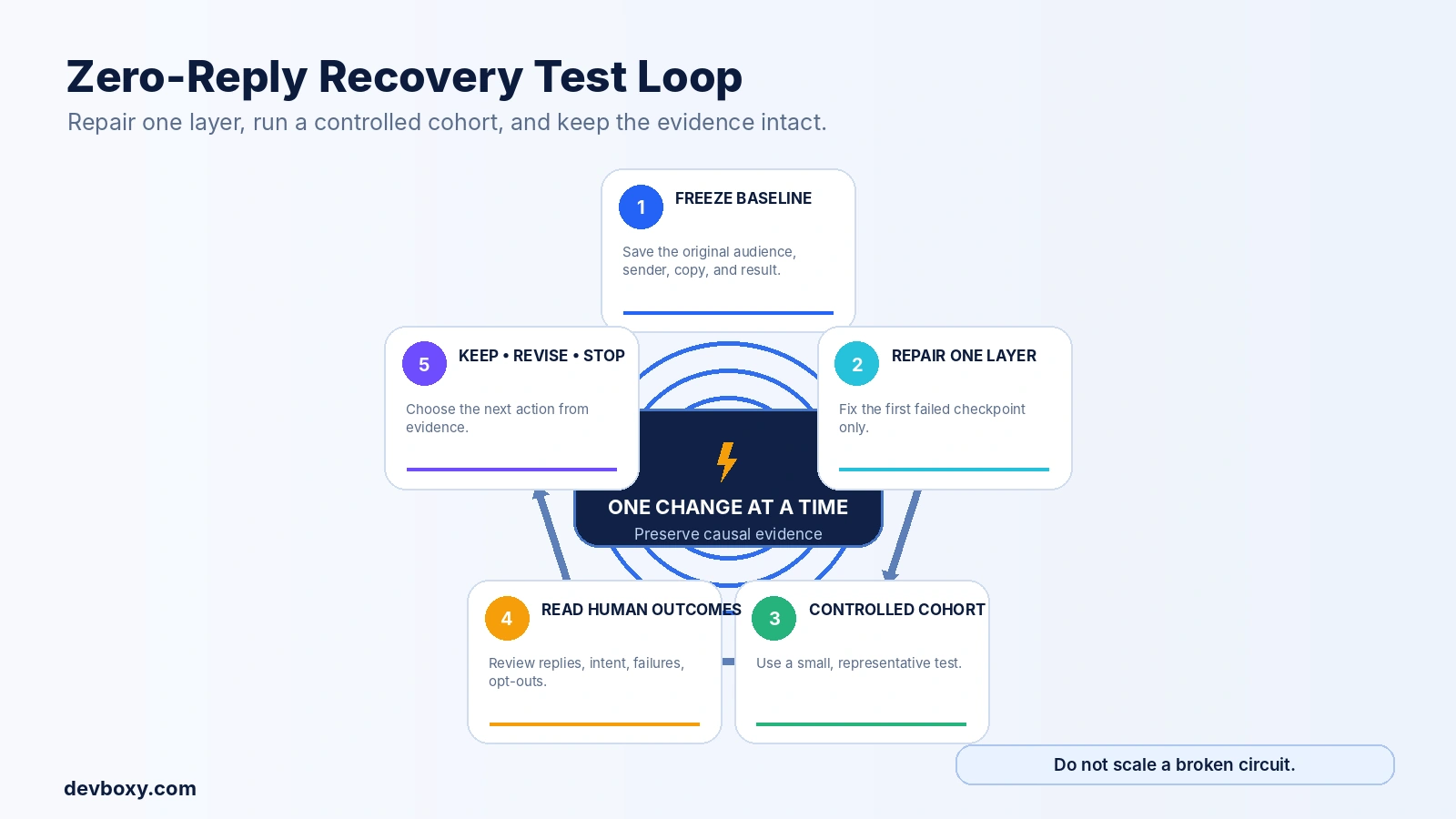
Once the first broken layer is identified, repair it and test a small, representative cohort that can be observed closely. The cohort should be large enough to produce useful operational evidence and small enough to pause without exposing the full audience or sender pool.
Use this sequence:
Freeze the baseline: save the original audience rules, message, sender set, schedule, and results.
Choose one primary repair: for example, fix sender authentication, replace stale records, narrow the persona, clarify the offer, or repair reply routing.
Keep other major variables stable: do not change the domain, offer, list source, sequence count, and CTA at the same time.
Observe recipient-level evidence: attempts, acceptance, deferrals, permanent failures, human replies, positive replies, opt-outs, and complaints.
Review reply content: a higher total reply count can still reflect more objections, wrong-person responses, or opt-outs.
Decide: keep the repair, revise the hypothesis, or stop the campaign.
Do not use open rate as the deciding metric. Tracking can be affected by image loading, privacy features, security scanning, and corporate link or content inspection. Human replies and operational delivery evidence are closer to the outcome you are trying to improve.
What Not to Do When a Campaign Gets No Replies
Do not scale volume to create an answer
If the system is broken, more volume creates more damage and less diagnostic clarity.
Do not rotate domains before identifying the cause
A new domain cannot repair poor targeting, a weak offer, broken reply routing, or unsafe sending practices.
Do not rewrite everything at once
Changing every variable may produce a different result, but it will not teach you which condition mattered.
Do not treat accepted mail as guaranteed inbox mail
Acceptance is necessary evidence, not proof of placement or attention.
Do not treat verification as permission to send
Verification describes address risk. It does not establish legal basis, relevance, expectation, or recipient interest.
Do not count automated responses as campaign success
Keep human intent, out-of-office messages, delivery events, and system acknowledgements separate.
Do not continue after clear opt-outs or permanent failures
The FTC’s CAN-SPAM compliance guide explains requirements for accurate identity, non-deceptive subjects, opt-out mechanisms, and honoring opt-out requests for covered commercial messages. Other jurisdictions have their own rules, so legal review must match the actual sender, recipient, and campaign.
A 30-Minute Zero-Reply Triage
Confirm unique prospects, actual attempts, accepted prospects, and human replies.
Check whether the planned sequence window has elapsed.
Group deferrals and permanent failures by provider, sender, domain, and list source.
Inspect a real received header from each major sender path.
Run DNS, authentication, domain-health, and selected blocklist checks.
Review list age, verification status, identity match, role ownership, duplicates, and suppression.
Read a sample of rendered emails as the recipient sees them.
Reduce the offer to one specific outcome, mechanism, proof point, and easy question.
Send an authorized external test reply and confirm attribution, notification, and stop-on-reply.
Choose one repair and define a controlled recovery cohort.
How DevBoxy Supports the Investigation
DevBoxy brings several parts of the diagnostic workflow into one operating environment:
single and bulk email verification for address-level classification;
Email DNS Checker for SPF, DKIM, DMARC, and MX review;
Domain Health Checker for broader sending-domain signals;
Blacklist Checker for selected public domain and IP listings;
Email Header Analyzer for message-routing and authentication evidence;
campaign sequences, automated follow-ups, and reply tracking in the outreach workflow.
Open the protected DevBoxy client portal to review your actual campaign and sender configuration.
No tool can guarantee inbox placement or replies. The useful outcome is a connected evidence trail that helps the team distinguish an infrastructure problem from a data, audience, offer, sequence, or reply-operations problem.
Fix the First Broken Layer
A cold email campaign with no replies is not one problem. It is a symptom shared by several possible failures.
Start with what the system can prove. Confirm execution. Read SMTP and provider evidence. Check authentication and reputation. Audit the recipient data. Validate that the audience owns the problem. Then examine the offer, message, sequence, and reply path.
The goal is not to invent a more persuasive explanation for silence. It is to find the first broken layer, repair it, and run a controlled test that produces better evidence.
When a campaign gets no replies, trace the path before you turn up the volume.
Frequently asked questions
How long should I wait before deciding a cold email campaign gets no replies?
Wait until the intended recipients have had a fair chance to receive and respond to the planned sequence. Use the actual business-day schedule, remaining follow-ups, deferrals, and recipient time zones rather than a universal number of days. A very small delivered sample may also be too uncertain to diagnose from reply percentage alone.
Does zero replies always mean a deliverability problem?
No. Deliverability is one possible cause, but zero replies can also result from failed campaign execution, stale or incorrect data, wrong decision-makers, weak relevance, an unclear offer, high reply friction, insufficient sequence coverage, or broken reply routing. Diagnose the message path in order instead of assuming the copy is responsible.
Can a cold email be accepted by the recipient server and still receive no reply?
Yes. SMTP acceptance means the receiving system accepted responsibility for the message. It does not prove inbox placement, visibility, human attention, audience relevance, or willingness to respond. Use acceptance as one piece of evidence, then review placement and business factors separately.
Should I rewrite my cold email copy first when nobody replies?
Not first. Confirm that the campaign sent, recipient systems accepted the messages, sender authentication is healthy, the list is current, and replies are reaching the correct inbox. Once those layers are proven, evaluate the audience, offer, copy, CTA, and follow-up sequence.
How can I test whether cold email replies are being tracked correctly?
Send an authorized campaign test to a controlled external mailbox, reply with a unique phrase, and confirm that the response reaches the intended mailbox, is recorded against the correct prospect and campaign, alerts the correct owner, and immediately stops future automated follow-ups.
Should I pause a cold email campaign that has zero replies?
Pause or narrow it when there is evidence of systemic delivery failure, authentication problems, lost replies, suppression errors, unexpected complaints, or clearly irrelevant targeting. When the evidence is incomplete but no urgent risk exists, use a small controlled cohort and test one repair at a time instead of exposing the full list.