Email verification results are useful only when they lead to a clear decision.
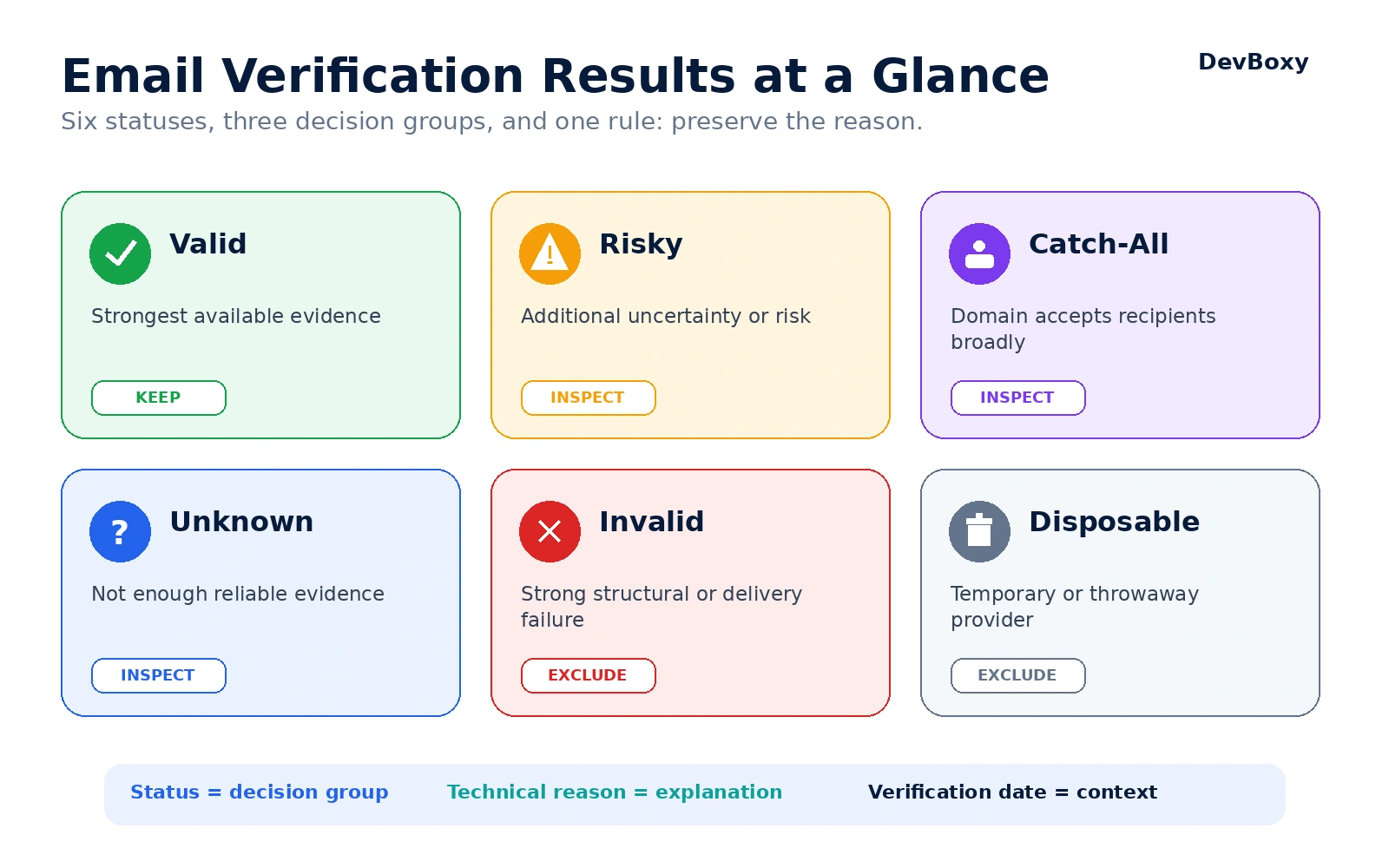
A label such as Valid, Invalid, Risky, Catch-All, Disposable, or Unknown is not just a technical outcome. It tells you how much confidence the verifier could establish, what kind of uncertainty remains, and whether the address should be kept, inspected, retried, or excluded before sending.
The important part is not the label alone. A professional workflow also preserves the technical reason, the date of verification, and the source of the address. That context prevents teams from treating every non-Valid result as the same problem.
For the broader foundation, start with what email verification is and why it matters. This guide focuses specifically on how to interpret each result and turn it into an operational list policy.
Key Takeaways
Valid is the strongest available result, but it is not a guarantee of future delivery or inbox placement.
Invalid reflects strong failure evidence and should normally be excluded from outreach.
Risky is an umbrella status whose exact meaning depends on the technical reason supplied by the verifier.
Catch-All means the domain accepts recipients broadly, so the individual mailbox cannot be confirmed with normal confidence.
Disposable means the address belongs to a temporary-email provider; it may function technically but still be unsuitable for sustained business communication.
Unknown means the check was inconclusive. It is not another word for Invalid.
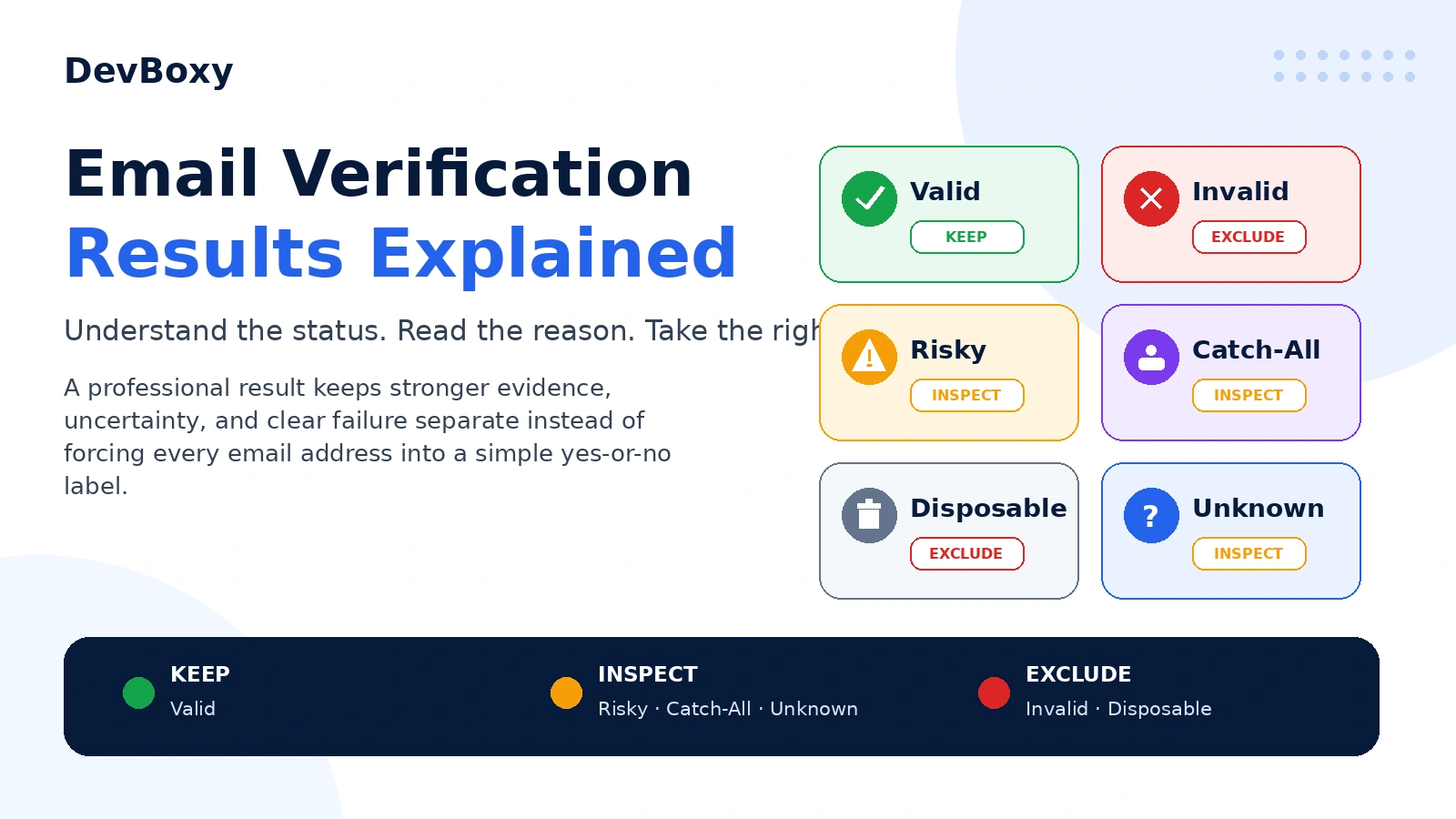
The cleanest operating model is to place results into three groups: Keep, Inspect, and Exclude.
Why Email Verification Statuses Are Not Universal
Email verification providers do not all use the same labels.
One service may return Valid, while another uses Deliverable. Catch-All may also appear as Accept-All. Some providers place uncertain addresses under Risky, while others separate Catch-All and Unknown into their own categories.
This variation is visible in public provider documentation. Hunter documents statuses such as Valid, Accept-All, Invalid, Disposable, and Unknown, while Bouncer uses Deliverable, Undeliverable, Risky, and Unknown. The naming differs even though the underlying operator problem is similar: decide which contacts have strong evidence, which contain uncertainty, and which show clear failure. See the Hunter status definitions and Bouncer terminology for examples.
Because labels vary, never build an automation around the status name alone. Store and evaluate:
the normalized result category;
the provider's original result;
the technical reason or sub-status;
the verification timestamp;
the list source;
the action taken.
This makes the workflow easier to audit and prevents a provider change from silently altering campaign behavior.
Email Verification Results at a Glance
The six result types used throughout DevBoxy's public verification workflow can be understood through three practical decision groups.
Status | What it means | Default action |
|---|---|---|
Valid | The address passed the checks the verifier could complete and has the strongest available evidence. | Keep in the normal sending segment. |
Risky | The address may be usable, but one or more signals make the outcome less predictable. | Inspect the reason and apply a defined risk policy. |
Catch-All | The domain accepts recipients broadly enough that the individual mailbox cannot be confirmed confidently. | Inspect separately from the clean Valid segment. |
Unknown | The verifier did not receive enough reliable evidence for a stronger classification. | Retry or review; do not automatically classify as Invalid. |
Invalid | Strong evidence indicates a structural, domain, routing, or mailbox-level failure. | Exclude from normal outreach. |
Disposable | The address belongs to a temporary or throwaway email provider. | Usually exclude from sustained outreach. |
DevBoxy simplifies these statuses into Send, Review, and Skip for single-address checks, and into Keep, Inspect, and Exclude for bulk-list operations. The underlying logic is the same: strong evidence proceeds, uncertainty remains visible, and clear failure stays out of the campaign.
What Does a Valid Email Result Mean?
A Valid result means the address produced the strongest available verification evidence at the time of the check.
Depending on the verifier, that evidence may include:
a plausible address structure;
a domain that exists and resolves;
usable mail-routing records;
no disposable-provider match;
a positive or otherwise supportive mailbox/provider response;
no catch-all behavior detected during the available checks;
no risk condition strong enough to move the address into another category.
For a technical explanation of how these layers are evaluated without delivering a normal message, read How Email Verification Works Without Sending an Email.
Can a Valid email still bounce?
Yes.
A Valid result describes the evidence available at one point in time. The mailbox can be disabled later, the recipient domain can change providers, the receiving system can reject the actual message for policy reasons, or a later delivery stage can fail.
A positive SMTP response is also not a permanent certificate. SMTP response classes describe what happened to a specific command during a specific transaction. RFC 5321 distinguishes positive, temporary, and permanent responses, but the operational meaning still depends on the command and server behavior.
A Valid result should therefore be interpreted as:
This address has the strongest evidence currently available and is the best candidate for the normal sending segment.
It should not be interpreted as:
This message is guaranteed to be delivered, placed in the inbox, opened, or answered.
What should you do with Valid addresses?
Keep them in the normal campaign-ready segment.
Preserve the verification date and reason.
Reverify them when the list becomes stale or returns after a long period of inactivity.
Continue applying suppression, opt-out, targeting, compliance, authentication, and sender-health controls.
What Does an Invalid Email Result Mean?
An Invalid result means the verifier found strong evidence that the address should not enter the normal sending workflow.
Possible reasons include:
malformed address structure;
a domain that does not exist;
a domain that explicitly does not receive email;
unusable mail-routing infrastructure;
a recipient rejection that supports mailbox failure;
another permanent condition that the verifier can classify confidently.
The exact reason matters. A malformed address is different from a mailbox that has been removed, and both are different from a domain-level mail-routing failure.
Not every SMTP rejection means the same thing
It is tempting to interpret every 5xx response as “the user does not exist,” but that is too broad. Permanent SMTP responses can relate to addressing, routing, policy, security, content, or another part of the transaction.
RFC 3463 enhanced status codes add detail by separating address, mailbox, routing, policy, and other status families. A responsible verifier evaluates the response in context instead of converting every permanent code into the same explanation.
The same care applies at the DNS layer. No explicit MX record is not automatically identical to a domain that cannot receive email, while a Null MX is an explicit no-mail declaration. The distinction is covered in the technical verification guide. You can also inspect a domain's current mail routes with the DevBoxy MX Checker.
What should you do with Invalid addresses?
Exclude them from normal outreach.
Keep the failure reason for audit and data-quality reporting.
Correct the address only when a reliable source supports the correction.
Do not guess a replacement mailbox and treat it as verified.
Feed recurring failure patterns back into the lead-source or import process.
What Does a Risky Email Result Mean?
Risky is the least standardized of the common result labels.
It normally means the verifier found some positive evidence, but one or more signals make the address less predictable than a clean Valid result. The status is useful only when the technical reason explains what created the risk.
Depending on the provider and its classification model, Risky may refer to:
limited mailbox-level confirmation;
a provider response that does not support a clean Valid result;
an address pattern associated with higher uncertainty;
a mailbox or domain condition that deserves operator review;
a result that is technically reachable but unsuitable for automatic approval.
Do not assume that Risky always means Catch-All, role-based, full mailbox, or spam-trap risk. Those are provider-specific possibilities, not a universal definition.
What should you do with Risky addresses?
Start with the reason, then consider the source, age, and business value of the contact.
Keep Risky addresses outside automatic Valid buckets.
Recheck temporary or provider-related conditions when appropriate.
Use stricter rules for old, purchased, or poorly sourced data.
Avoid mixing a large Risky segment into the first send from a new mailbox or domain.
Track results separately so address-quality risk does not disappear inside campaign averages.
What Does a Catch-All Email Result Mean?
A Catch-All result means the recipient domain accepts email broadly enough that the verifier cannot confirm the individual mailbox with normal confidence.
For example, the mail server may respond similarly to both:
[email protected]
[email protected]
That behavior suggests the domain may be configured to accept many or all recipient names. The target address may belong to a real person, but the domain-level response does not prove it.
Catch-All is therefore a statement about mailbox-level certainty, not a verdict that the address is definitely good or definitely bad.
Catch-All is not the same as Invalid
An Invalid result points to strong failure evidence. A Catch-All result preserves uncertainty because the domain's behavior prevents the usual recipient distinction.
That difference is commercially important. Automatically deleting every Catch-All contact may remove legitimate prospects at companies that use broad recipient acceptance. Automatically approving every Catch-All address creates the opposite problem: invented or outdated recipients can enter the same segment as clean Valid records.
What should you do with Catch-All addresses?
Keep them in a separate review segment.
Consider the reliability and recency of the source.
Prioritize contacts with strong company, role, and identity context.
Apply a cautious sending policy rather than normal full-volume treatment.
Monitor bounces separately and stop if the segment performs poorly.
Do not describe the address as confirmed unless additional evidence supports that conclusion.
What Does a Disposable Email Result Mean?
A Disposable result means the address belongs to a provider designed for temporary or short-lived inboxes.
A disposable address can be syntactically correct, use a real domain, and receive email at the moment it is checked. That is why disposable detection is not the same as syntax validation or mailbox failure.
The issue is suitability and continuity. A temporary inbox may disappear quickly, may not represent a durable customer or business identity, and may undermine workflows that depend on future account recovery, billing communication, lead nurturing, or sustained outreach.
What should you do with Disposable addresses?
For cold outreach and long-term B2B contact data, the normal action is to exclude them.
For product signups, the policy depends on the service. Some businesses block disposable providers. Others allow access but restrict sensitive actions until the user adds a durable address. The decision should be intentional rather than hidden inside a generic Invalid rule.
Keep Disposable as its own category.
Do not relabel it as a nonexistent mailbox.
Apply a policy based on the actual workflow.
Review false-positive complaints when legitimate privacy-oriented providers are involved.
What Does an Unknown Email Result Mean?
Unknown means the verifier could not collect enough reliable evidence to classify the address as Valid, Invalid, Catch-All, Disposable, or another stronger result.
Common causes include:
a temporary
4xxSMTP response;a connection timeout;
greylisting;
rate limiting;
provider policy restrictions;
anti-enumeration controls;
a blocked mailbox check;
a temporary DNS or mail-routing problem;
an inconclusive server response.
Greylisting is a good example. A receiving system can temporarily reject an unfamiliar sender and expect a legitimate mail system to retry later. RFC 6647 documents greylisting practices and their use of temporary failures. A first check can therefore be inconclusive without proving that the mailbox is invalid.
Unknown is not Invalid
The distinction is simple:
Invalid: enough evidence supports failure.
Unknown: not enough evidence supports a confident decision.
Combining the two can silently discard contacts because a provider was temporarily unavailable or unwilling to expose mailbox information.
What should you do with Unknown addresses?
Keep them outside the clean Valid segment.
Retry when the reason appears temporary.
Compare the verification timestamp with the campaign launch date.
Inspect whether the problem affects one address, one domain, one provider, or the whole job.
Use source quality and business value to decide whether further investigation is justified.
Do not send a large Unknown segment automatically.
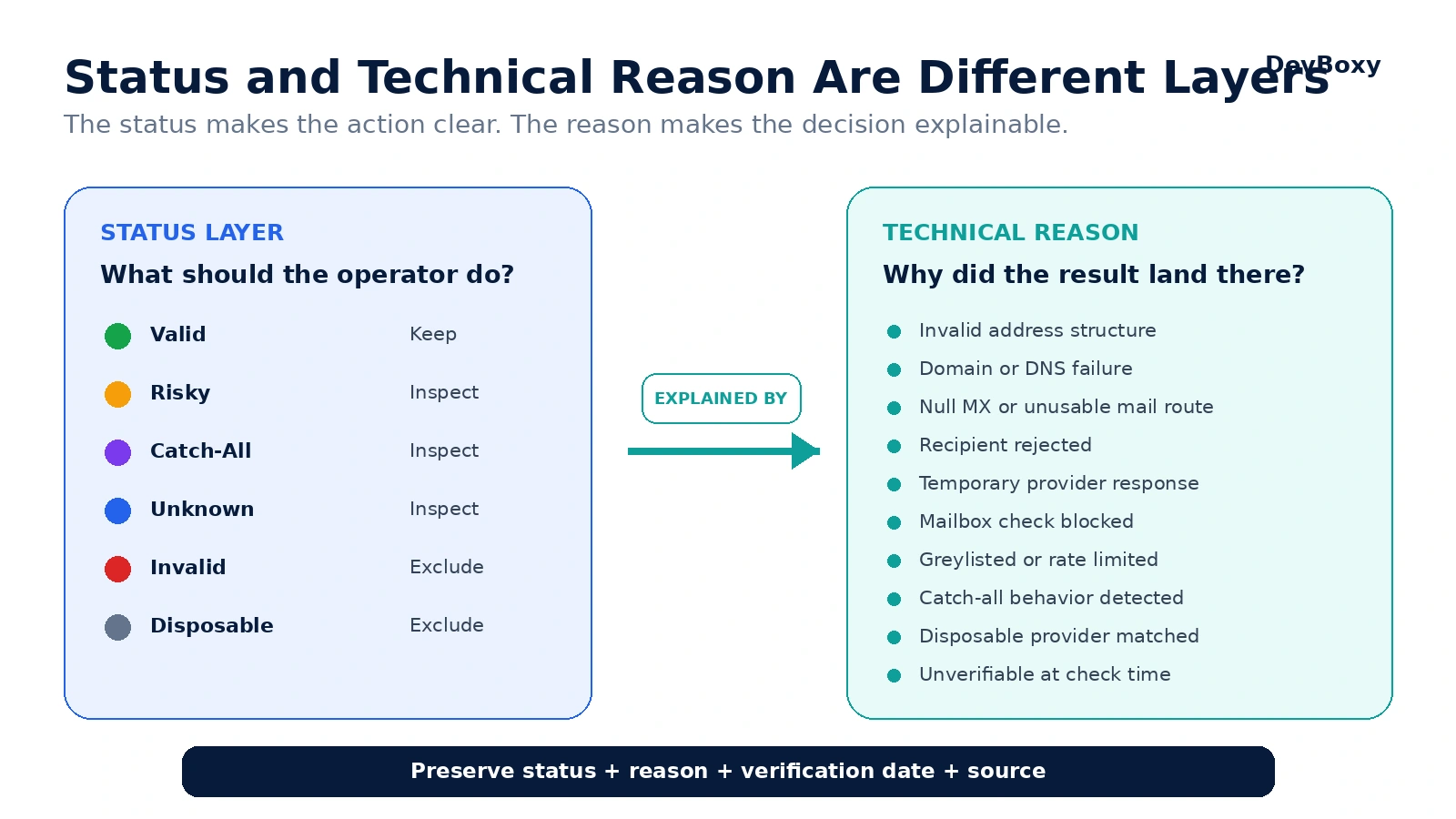
Status and Technical Reason Are Not the Same Thing
The status is the operational layer. The technical reason is the explanatory layer.

A status such as Unknown might be supported by several different reasons:
temporary provider response;
greylisted;
mailbox check blocked;
rate limited;
unverifiable at the time of the check.
Those reasons may lead to different actions. Greylisting can justify a retry. A persistent provider-policy block may require a longer review or a different source of evidence. A domain-wide failure may indicate a list or DNS problem rather than an individual mailbox problem.
For every verification record, preserve at least:
Field | Why it matters |
|---|---|
Status | Supports the high-level Keep, Inspect, or Exclude decision. |
Technical reason | Explains why the address received that status. |
Verified at | Shows how old the evidence is. |
Source | Helps distinguish trusted first-party data from uncertain imports. |
Action taken | Makes the list policy auditable and repeatable. |
How to Turn Verification Results Into a List Policy
A list policy should be decided before the campaign starts, not improvised after the results arrive.
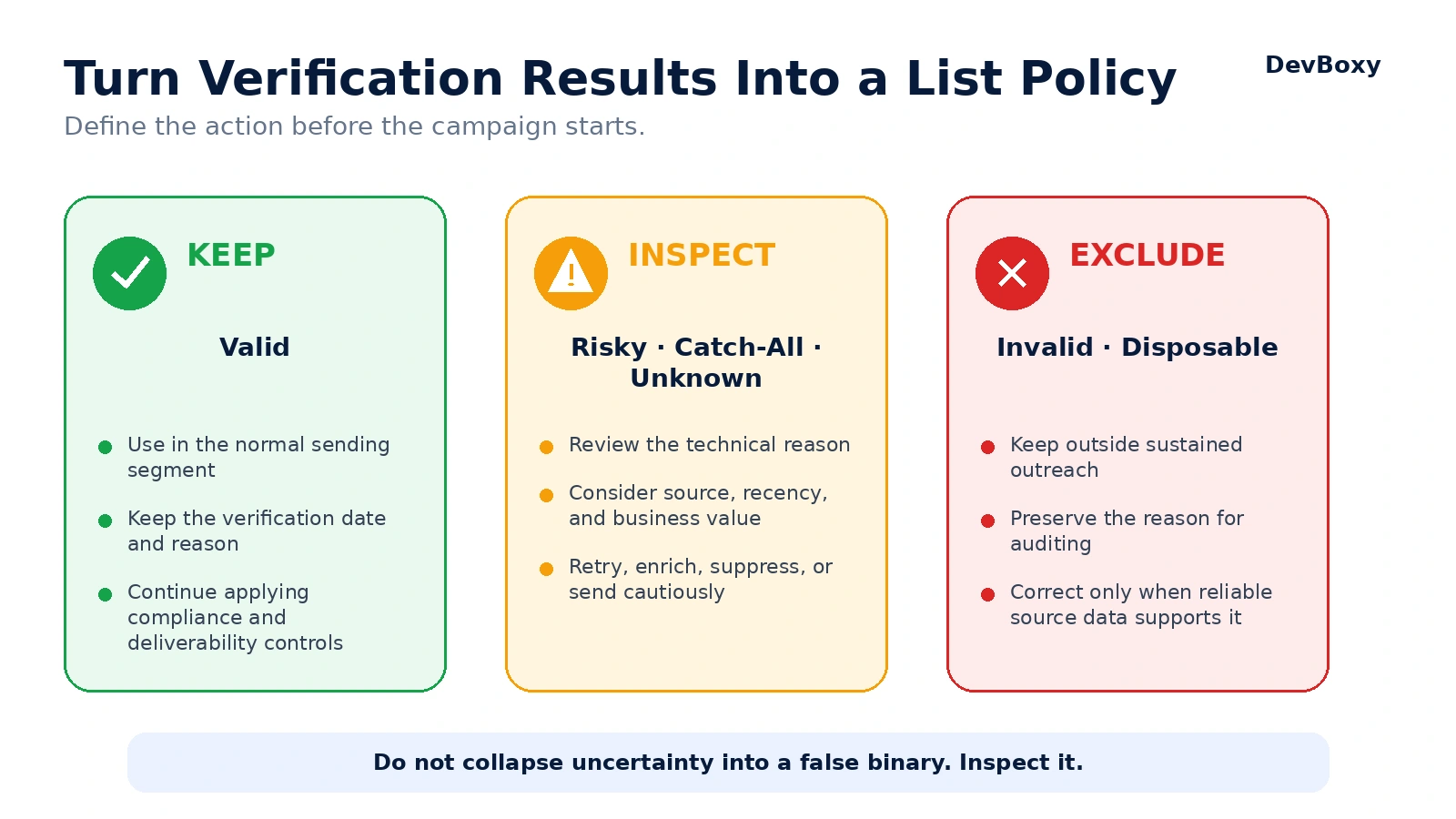
Keep: Valid
Use Valid contacts in the normal sending segment, while continuing to apply your standard compliance, suppression, sender-health, and campaign-quality controls.
Inspect: Risky, Catch-All, and Unknown
These statuses contain different forms of uncertainty. Review the reason, source, recency, and value of the contact before deciding whether to retry, enrich, suppress, or send cautiously.
Exclude: Invalid and Disposable
Keep clear failures and temporary-email providers outside sustained outreach unless a documented business rule requires different handling.
Decision | Status | Recommended control |
|---|---|---|
Keep | Valid | Normal sending segment; preserve verification context. |
Inspect | Risky, Catch-All, Unknown | Separate queue, reason-based review, optional retry, cautious policy. |
Exclude | Invalid, Disposable | Suppress from normal campaigns and retain the exclusion reason. |
For larger files, this policy belongs inside the bulk-cleaning workflow. Read what bulk email verification is and how it works for the complete upload, classification, segmentation, and export process.
How to Handle Mixed Results in a Real List
Suppose a list of 10,000 contacts returns a mixture of all six statuses. The wrong response is to export one file containing everything except Invalid and start sending at full volume.
A better workflow is:
Create the Valid segment. Keep it as the primary campaign-ready group.
Split the review segment by reason. Do not mix Catch-All, temporary Unknown, and other Risky conditions into one unexplained bucket.
Retry only retryable outcomes. A temporary provider response deserves different treatment from a persistent catch-all condition.
Apply source quality. An Unknown address collected directly from a recent customer is not equivalent to an Unknown address from an old third-party list.
Exclude clear failures. Remove Invalid and Disposable records from normal outreach.
Preserve the original record. Keep stable IDs, verification timestamps, and status reasons so results can be matched back safely.
Reverify before reuse. A clean result from months ago should not automatically govern a new campaign.
This approach protects the clean segment from hidden uncertainty while keeping useful review candidates available for a deliberate decision.
What Verification Results Do Not Tell You
No verification status can answer every question about email performance.
A result does not prove:
future mailbox availability;
inbox placement;
that the named person controls the address;
permission to contact the recipient;
that the message will be opened;
that the prospect will reply;
healthy sender or domain reputation;
successful campaign performance.
Recipient verification and sender deliverability are connected but separate. Use the DevBoxy Domain Health Checker to inspect sender-side authentication, mail-routing, blacklist, and related domain signals instead of expecting a recipient status to answer those questions.
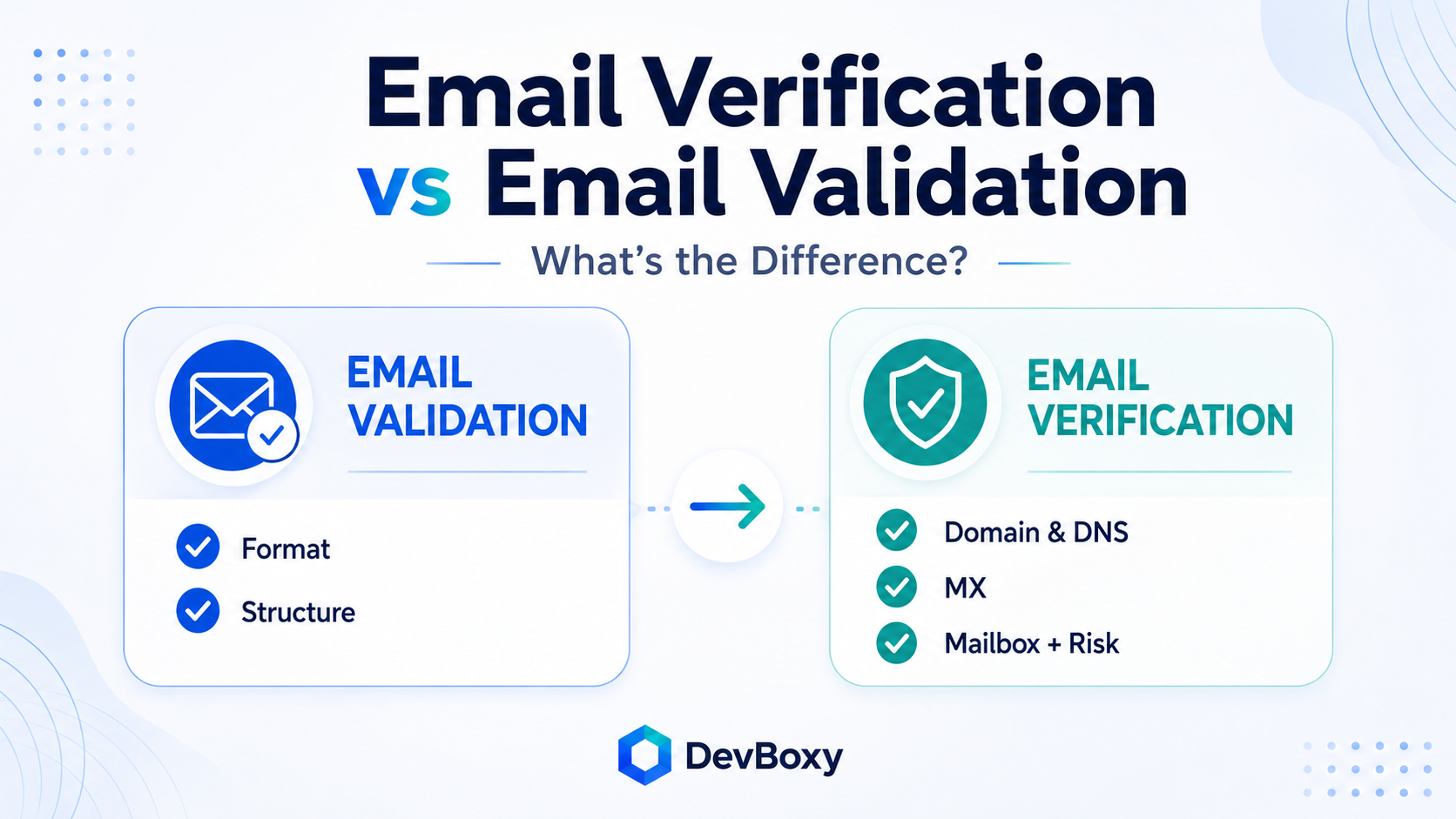
The distinction between validation, verification, authentication, and deliverability is explained further in Email Verification vs Email Validation.
How DevBoxy Presents Verification Results
DevBoxy keeps the primary decision simple while leaving the technical reason available for review and debugging.
For a single address, the public result model is:
Send: Valid
Review: Risky, Catch-All, Unknown
Skip: Invalid, Disposable
For bulk lists, the equivalent model is:
Keep: Valid
Inspect: Risky, Catch-All, Unknown
Exclude: Invalid, Disposable
This structure prevents uncertain contacts from entering an automatic Valid bucket and prevents temporary or inconclusive results from being silently relabeled as Invalid.
Use the DevBoxy Email Verifier to check one address and review the evidence behind the result.
For a CSV or Excel database, use the DevBoxy Bulk Email Verifier to classify the full list and preserve separate Keep, Inspect, and Exclude segments before creating a campaign.
The Best Result Is an Explainable Decision
Email verification should not turn a complex technical process into false certainty.
Valid is the strongest available evidence, not a delivery promise. Invalid reflects clear failure. Risky requires the reason. Catch-All preserves mailbox uncertainty. Disposable identifies temporary-provider use. Unknown records an inconclusive check rather than inventing an answer.
When the status, technical reason, verification date, and list source stay together, teams can make decisions that are consistent, reviewable, and appropriate for the actual level of evidence.
That is the real purpose of email verification results: not to label every address as simply good or bad, but to show what is known, what remains uncertain, and what the operator should do next.
Frequently asked questions
What does a Valid email verification result mean?
Valid means the address passed the checks the verifier could complete and has the strongest available evidence at the time of verification. It is suitable for the normal sending segment, but it does not guarantee future delivery, inbox placement, opens, or replies.
What is the difference between Invalid and Unknown?
Invalid means the verifier found strong evidence of a structural, domain, routing, or mailbox-level failure. Unknown means the check was inconclusive because the system did not receive enough reliable evidence. Unknown should be reviewed or retried rather than automatically treated as Invalid.
Is a Catch-All email address safe to send to?
A Catch-All result does not prove that the mailbox is valid or invalid. The domain accepts recipients broadly, which limits mailbox-level certainty. Keep Catch-All contacts separate, review their source and recency, and use a cautious sending policy rather than mixing them into the clean Valid segment.
What does a Risky email result mean?
Risky is a provider-dependent status indicating that the address may be usable but carries additional uncertainty or risk. The technical reason matters more than the label alone, so review the underlying signal before deciding whether to retry, suppress, enrich, or send cautiously.
What is a Disposable email result?
Disposable means the address belongs to a temporary or throwaway email provider. The mailbox may function technically, but it is usually unsuitable for sustained outreach, account recovery, lead nurturing, or other workflows that require a durable address.
Can a Valid email address still bounce?
Yes. Verification is a point-in-time assessment. A mailbox can close later, a provider can change its policy, or the actual message can fail at a later delivery stage. Sender reputation, authentication, content, volume, and receiving-provider filtering also remain separate factors.