Email verification and email validation are related processes, but they are not governed by one universal naming standard.
A useful working distinction is:
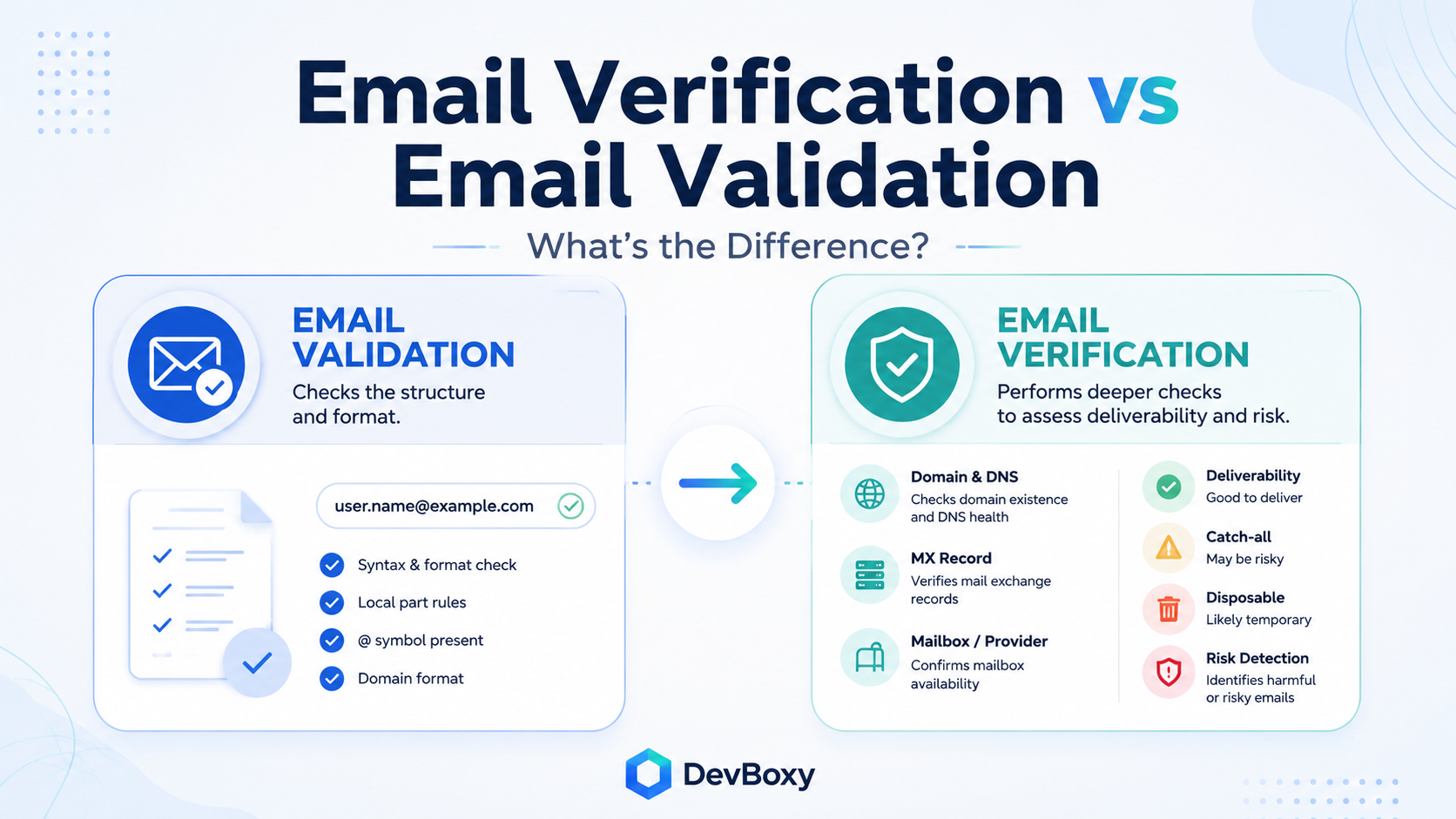
Email validation asks whether an address is structurally plausible and clean enough to process.
Email verification goes further by examining the domain, mail-routing infrastructure, available mailbox or provider signals, catch-all behavior, disposable-address data, and other risk indicators.
what email verification is and why it matters
That distinction is helpful, but it is not an industry-wide rule. Some providers use validation for basic format checks. Others use the same word for a complete process that includes DNS, mailbox, and risk checks. Amazon SES, for example, calls its service an Email Validation API while documenting syntax, DNS, mailbox-existence, role-address, and disposable-domain evaluations. Mailgun and Twilio SendGrid also use “validation” for services that go beyond simple formatting.
The practical lesson is simple:
Do not judge an email-quality tool by whether it calls the process validation or verification. Judge it by what it actually checks, what results it returns, and how honestly it handles uncertainty.
Key Takeaways
Validation commonly checks the structure and cleanliness of an email address.
Verification commonly adds domain, DNS, MX, provider, mailbox, catch-all, disposable, and risk signals.
The terms are often used interchangeably by software providers.
A well-formatted email address can still belong to a nonexistent or unavailable mailbox.
Verification reduces uncertainty, but it cannot guarantee future delivery or inbox placement.
Modern email-quality tools usually combine validation and verification into one workflow.
Why Email Validation and Verification Are Easy to Confuse
The confusion starts because different teams use the same words for different jobs.
A developer building a signup form may use email validation to mean checking whether the input follows an acceptable address format.
A cold-email operator may use email verification to mean checking whether a prospect address appears usable before sending.
A software provider may call its product an email validator even when the product performs domain, MX, mailbox, catch-all, and disposable-address checks.
Official product documentation confirms that this naming overlap is real. Amazon SES groups syntax, DNS, mailbox, role-address, disposable-domain, and other evaluations under “Email Validation.” Mailgun’s Validate service returns results such as deliverable, undeliverable, catch-all, and unknown, while Twilio SendGrid calls its single and bulk address-quality service “Email Address Validation.”
This is why definitions should be treated as a practical framework rather than a strict technical law.
What Is Email Validation?
Email validation usually refers to checking whether an email address is structurally plausible.
Consider:
[email protected]The address has two main parts:
alexis the local part.example.comis the domain.
The @ symbol separates them.
A validation process may examine whether:
the local part is present;
the address contains one appropriate@symbol;
the domain is present;
spaces or obvious formatting mistakes exist;
the domain labels have a plausible structure;
the address contains unsupported or misplaced characters;
copied data contains leading or trailing whitespace;
the input can be normalized consistently.
RFC 5322 defines the syntax used for internet email messages and address specifications, although production applications often support a practical subset rather than every theoretically valid address form.
Validation can quickly reject examples such as:
alex@@example.com@example.comalex example.comIt can also normalize an address by removing accidental whitespace or standardizing the domain portion.
What validation can tell you
Validation can help answer:
Could this address be processed as a plausible email address?
What validation cannot tell you
A structurally correct address may still:
use a domain that does not exist;
belong to a domain that cannot receive email;
point to a mailbox that has been closed;
be a disposable address;
belong to a catch-all domain;
return an inconclusive provider response;
bounce when an actual message is sent.
A format check therefore protects input quality, but it does not establish mailbox usability.
What Is Email Verification?
Email verification usually refers to the broader process of gathering evidence about whether an address appears usable.
A verification workflow normally begins with validation. There is little value in contacting DNS or mail infrastructure for an address that is clearly malformed.
Addresses that pass the first layer may then be checked for:
domain existence;
DNS resolution;
MX records and mail routing;
disposable-email providers;
available mailbox or server responses;
catch-all or accept-all domain behavior;
temporary provider restrictions;
other risk signals used by the verification service.
DevBoxy’s public Email Verifier describes a layered workflow covering syntax, domain and DNS signals, MX records, disposable-provider signals, available mailbox and provider responses, catch-all behavior, and risk.
Verification is better understood as an evidence-based classification than a perfect confirmation.
A receiving server may refuse to expose mailbox details. It may temporarily defer the request, apply greylisting, restrict address enumeration, accept every recipient, or delay deeper recipient validation until a later delivery stage.
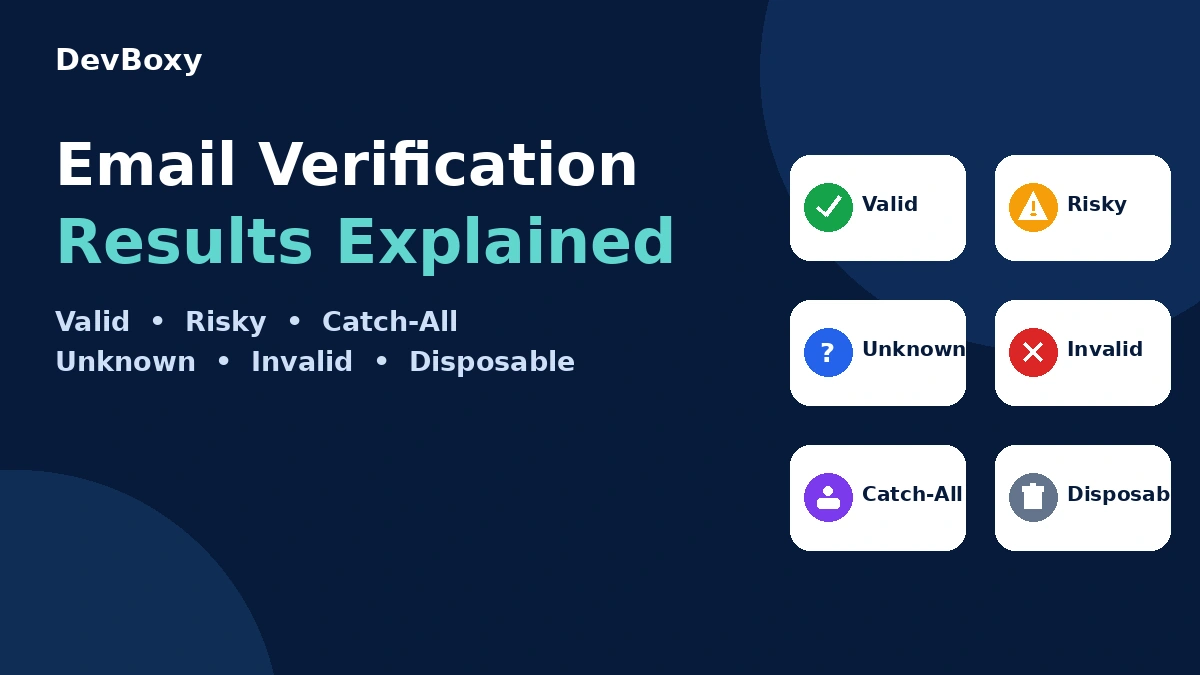
That is why responsible verification systems need results such as:
Valid
Invalid
Risky
Catch-All
Disposable
Unknown
rather than forcing every address into a simple yes-or-no answer.
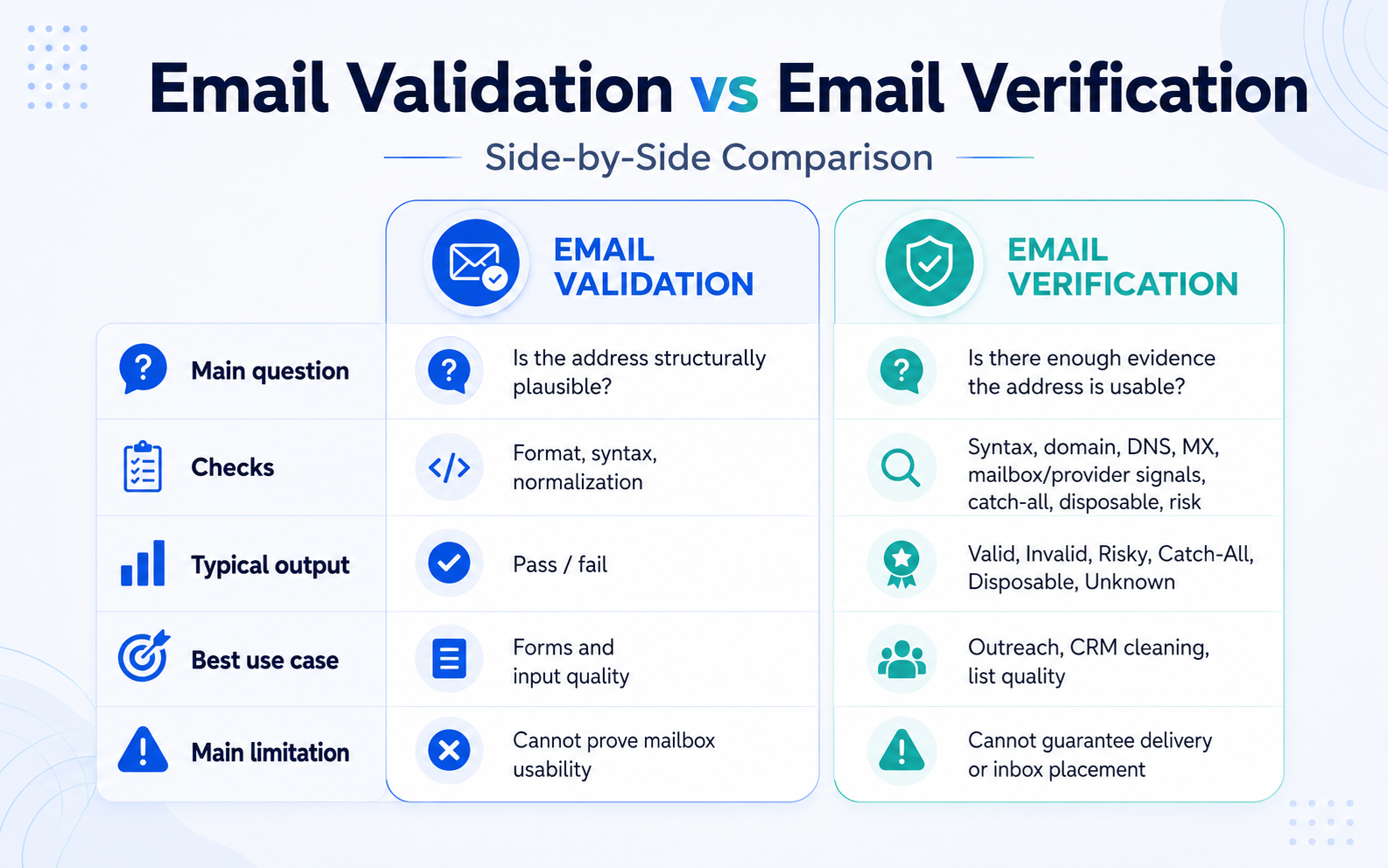
Email Validation vs Email Verification: Side-by-Side Comparison
Area | Email Validation | Email Verification |
|---|---|---|
Main question | Is the address structurally plausible? | Is there enough evidence that the address is usable? |
Format and syntax | Yes | Yes |
Input normalization | Commonly included | Commonly included |
Domain and DNS | Sometimes included | Commonly included |
MX mail-routing checks | Depends on provider terminology | Commonly included |
Mailbox/provider signals | Usually not part of basic validation | Commonly attempted |
Catch-all detection | Usually not | Often included |
Disposable-address detection | May be included | Often included |
Risk classification | Limited or absent | Commonly included |
Typical result | Pass or fail | Valid, Invalid, Risky, Catch-All, Disposable, or Unknown |
Main limitation | Cannot establish mailbox usability | Cannot guarantee future delivery or inbox placement |
This table reflects the most useful practical distinction. A provider may still label the full right-hand workflow as “validation.”
What Each Process Catches: Practical Examples
The difference becomes clearer when the same addresses are passed through both layers.
Example 1: Clearly malformed address
alex@@example.comValidation should reject this address because its structure is malformed.
No deeper verification should be necessary.
Example 2: Plausible format, nonexistent domain
[email protected]The address may look structurally plausible, but the domain cannot provide usable mail infrastructure.
A basic syntax check may pass it. Domain and DNS checks should expose the failure.
Example 3: Real domain, unavailable mailbox
[email protected]The format may be correct. The domain may exist and publish valid MX records.
The individual mailbox may still have been removed after the employee left the company.
A format-only validation cannot detect that situation. A deeper verification process may receive evidence that the mailbox is unavailable, although provider behavior can sometimes make the result inconclusive.
Example 4: Catch-all domain
A catch-all domain may respond similarly for both a real address and a randomly invented recipient.
That means the domain appears willing to accept recipients broadly, but the verifier cannot confidently establish whether the specific mailbox exists.
The correct result is uncertainty—not automatically Valid and not automatically Invalid.
Example 5: Disposable address
A disposable address can be correctly formatted, use a real domain, and receive messages temporarily.
Syntax validation may therefore pass it.
A verification or risk-classification layer can identify that the domain belongs to a temporary-email provider and classify it separately.
Validation and Verification Work Best as One Pipeline
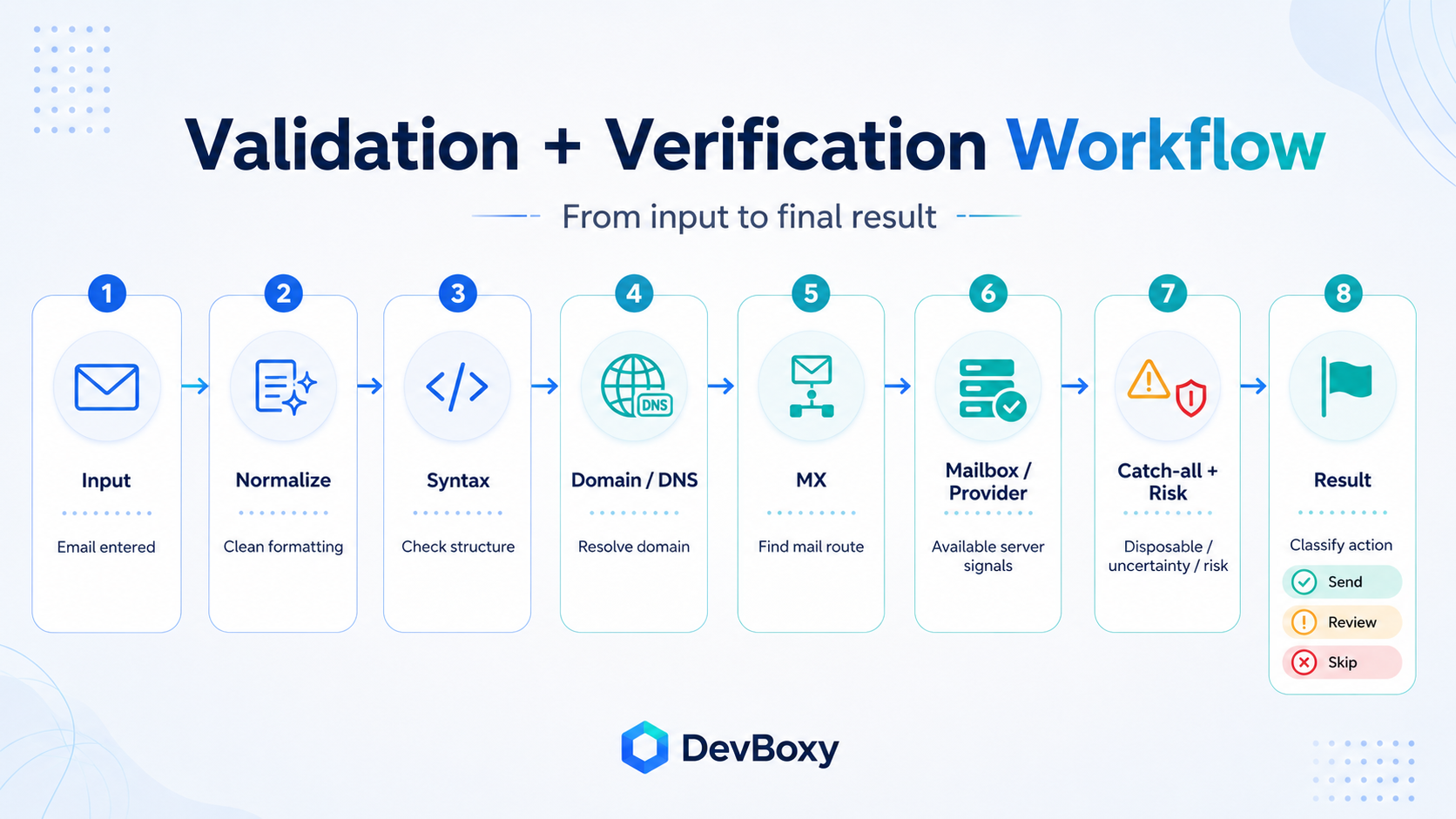
Validation and verification should not be treated as competing alternatives.
Validation is normally the first filter inside a broader verification workflow.
A practical pipeline looks like this:
Input
→ Normalize
→ Validate syntax
→ Check domain and DNS
→ Inspect MX routing
→ Evaluate available mailbox/provider signals
→ Check catch-all and disposable behavior
→ Apply risk rules
→ Return a result and recommended action
This layered model avoids unnecessary work.
An address that fails at the syntax stage does not need an MX lookup. A domain that does not exist does not need a mailbox-level check. An address that reaches the provider stage may still require an uncertain result when the receiving system does not provide enough information.
Modern services often expose this entire workflow through one tool or API, regardless of whether they call the product validation, verification, or checking. Official AWS SES, Mailgun, and SendGrid documentation all demonstrate that a product named “validation” can include multiple layers beyond syntax.
Which One Should You Use?
The right workflow depends on what will happen to the address next.
During a signup or lead form
Basic validation should happen immediately so obvious formatting errors do not enter the database.
For higher-value actions—such as trial accounts, demo requests, or marketplace registration—a deeper real-time verification process may also be appropriate.
The implementation should avoid blocking legitimate users merely because a provider returns an uncertain result.
Before a cold email campaign
Use full verification rather than relying on format validation alone.
Cold outreach lists can contain:
old employee addresses;
incorrect prospecting data;
nonexistent mailboxes;
disposable addresses;
catch-all domains;
temporary provider failures;
malformed imports.
A syntax pass does not make these addresses ready for outreach.
When importing an existing CRM or spreadsheet
Use bulk verification.
An older database may contain addresses that were valid when originally collected but have since changed, closed, or become uncertain.
Bulk verification lets you separate stronger contacts from addresses that should be reviewed or excluded.
When checking one important prospect
Use a single-address verifier.
A one-off check is useful before contacting an important decision-maker, reactivating an old lead, or manually adding a contact to a sequence.
When creating a user account
Be careful with terminology.
In authentication systems, “email verification” often means sending a link or code and asking the user to prove that they control the inbox. Firebase, for example, supports generating and sending email-verification links for user accounts. That is an ownership-confirmation workflow, not the same process as verifying a cold-email list before sending.
Do Not Confuse Verification With Email Authentication
Email validation and verification evaluate the recipient address.
Email authentication evaluates the sender and sending domain.
SPF, DKIM, and DMARC help receiving systems determine whether a message is authorized and aligned with the domain presented to the recipient.
They do not establish whether the recipient mailbox exists.
A campaign may therefore have:
correctly authenticated sending domains;
a properly formatted prospect address;
valid MX records;
and still fail because the mailbox no longer exists or the receiving provider does not accept the message.
These are connected parts of email quality, but they solve different problems.
Verification Is Also Different From Deliverability
A verified address can still receive a message in spam.
Inbox placement depends on factors such as:
sender and domain reputation;
SPF, DKIM, and DMARC;
sending volume and pacing;
complaint history;
message content;
link reputation;
recipient behavior;
receiving-provider filtering.
DevBoxy explicitly describes verification as a point-in-time risk signal rather than a guarantee of future delivery or inbox placement.
Verification improves recipient-data quality. It does not control the entire delivery ecosystem.
How to Evaluate an Email Validator or Verifier
Do not select a tool based only on the name shown in its navigation menu.
Ask what the system actually does.
1. Does it check only the format?
A basic validator may be suitable for immediate form feedback, but it is not enough for cleaning an outreach list.
2. Does it inspect the domain and MX records?
The service should explain whether it checks domain existence and mail-routing infrastructure.
3. Does it use available mailbox or provider signals?
Find out whether the tool attempts deeper recipient-level checks and how it handles providers that restrict them.
4. Does it separate Catch-All from Valid?
A catch-all result should not be silently placed in the same bucket as a confidently Valid address.
5. Does it identify disposable addresses?
Temporary addresses may be technically functional but unsuitable for many business workflows.
6. Does it support Unknown or temporary results?
A tool that classifies every address as good or bad may be hiding uncertainty rather than resolving it.
7. Does it explain the reason behind the result?
A visible technical reason is more useful than a mystery score.
8. Does it make unrealistic guarantees?
Avoid tools that promise zero bounces, perfect mailbox certainty, or guaranteed inbox placement.
No verification result can permanently guarantee future mailbox state or receiving-provider behavior.
How DevBoxy Handles Validation and Verification
DevBoxy combines validation and verification signals into one decision-oriented workflow.
Its public Email Verifier checks:
address syntax;
domain and DNS signals;
MX mail-routing records;
disposable-provider signals;
available mailbox and provider responses;
catch-all behavior;
risk classification.
The result is then mapped to three operational actions:
Decision | Results |
|---|---|
Send | Valid |
Review | Risky, Catch-All, Unknown |
Skip | Invalid, Disposable |
This model keeps the primary decision simple while preserving the reason behind the classification.
Use the DevBoxy Email Verifier when you need to check one address before outreach.
For a CSV, Excel file, or larger contact database, use the DevBoxy Bulk Email Verifier to classify the complete list and separate contacts that can be kept, reviewed, or excluded. DevBoxy’s bulk workflow supports CSV and Excel formats and returns the same core result categories used by the single-address workflow.
For the protocol-level explanation behind the deeper checks, read How Email Verification Works Without Sending an Email.
The Difference Matters Less Than the Checks
Email validation and email verification are useful labels, but they should not become a distraction.
Validation commonly refers to checking whether an address is structurally plausible. Verification commonly adds domain, mail-routing, mailbox, catch-all, disposable, and risk evidence.
The terms overlap because providers name their services differently.
The best question is therefore not:
Does this tool call itself a validator or verifier?
The better questions are:
What does it check?
How does it handle uncertainty?
What evidence does it show?
What action should I take from the result?
A useful email-quality workflow performs the necessary checks, keeps uncertain addresses separate, and avoids making promises that the underlying evidence cannot support.
Frequently asked questions
Are email validation and email verification the same?
The terms are often used interchangeably, but a useful practical distinction is that validation checks whether an address is structurally plausible, while verification adds domain, MX, mailbox, catch-all, disposable, and risk signals. Because providers use different naming conventions, the actual checks matter more than the product label.
Which comes first: email validation or verification?
Validation normally comes first. Clearly malformed addresses can be rejected before the system performs DNS, MX, provider, or mailbox-level checks. Most modern email-quality tools combine both stages into one workflow.
Can a validated email address still bounce?
Yes. An address may have the correct format while the domain, mail route, or individual mailbox is unavailable. Even a verified address can bounce later because mailbox state and receiving-provider behavior can change after the check.
Does email verification guarantee inbox placement?
No. Verification evaluates the recipient address. Inbox placement also depends on sender authentication, reputation, sending behavior, complaint history, message content, links, engagement, and the receiving provider's filtering decisions.
Is email authentication the same as email verification?
No. Email verification evaluates the recipient address. Email authentication uses technologies such as SPF, DKIM, and DMARC to help receiving systems evaluate whether a message is authorized for the sending domain.